





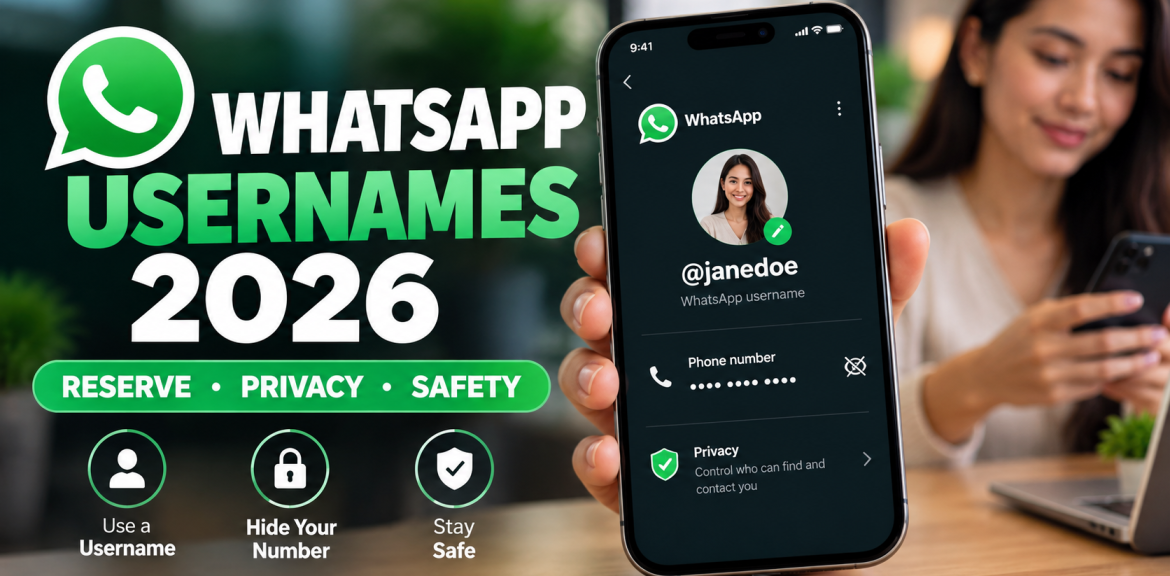

Quick answer: WhatsApp usernames are an optional new way to let people contact you without giving them your phone number. As of October 2026, you may be able to reserve a username before username-based messaging is activated in your region. On an updated mobile app, look for Settings/You → Account → Username or the username option within your profile; the exact path depends on the version being rolled out. A username does not replace the phone number required to register WhatsApp, and it does not hide your number from people who already have it saved.
That distinction matters. A reserved username is a name held for future use, not necessarily a working way for strangers to message you today. This guide separates what Meta and WhatsApp have officially confirmed from what you should check on your own phone.
Last reviewed: 15 October 2026 · Source basis: Meta’s June 2026 announcement and WhatsApp Help Center documentation. Availability varies by account, app version and country. This is a documentation-based guide, not a claim that we personally tested the rollout in every region.
What are WhatsApp usernames, and what changes in 2026?
A WhatsApp username is a unique identifier, such as @janedoe, that people can use to find and contact an account without first exchanging phone numbers. It is different from the display name on your profile: multiple people can share a display name, but each username must be unique.
Meta announced username reservations on 29 June 2026 and said the wider feature would roll out gradually. WhatsApp’s official username explanation confirms that phone numbers remain necessary for account registration.
Reserved versus active: the difference many people miss
| Status | What it means | Can others message you using it? |
|---|---|---|
| Username not available | The setting has not appeared for your account or region. | No. |
| Username reserved | WhatsApp is holding your chosen name until activation. | Not necessarily; wait for the in-app activation notice. |
| Username active | Username-based contact is enabled for your account. | Yes, subject to username-key and other contact settings. |
Practical takeaway: Do not replace the phone number on your business website, contact cards or advertisements with a reserved username until you have confirmed it works for customers.
How to reserve a WhatsApp username on iPhone or Android
WhatsApp’s documentation shows two navigation patterns as interfaces change. Use the one you actually see in your updated app rather than assuming everyone has identical menus.
- Update WhatsApp using the official Apple App Store or Google Play Store.
- Open WhatsApp on your primary mobile phone.
- Look under Settings → Account → Username, the route described in Meta’s announcement. In newer interfaces, open You → your profile → Create username / Reserve username, as described in the WhatsApp Help Center.
- Enter your preferred unique username. If unavailable, try a meaningful variation or the app’s suggestions.
- Follow the displayed prompts to save or reserve it. Read the confirmation carefully to see whether it is reserved or already active.
- Wait for an official WhatsApp notification if activation is still pending.
WhatsApp says reservations are not currently available through WhatsApp Web or Desktop. Use your main phone. Never install a modified APK or pay a third-party website claiming it can unlock the feature.
What usernames are allowed?
According to WhatsApp’s username rules, a username must be 3–35 characters, use lowercase letters, numbers, underscores or periods, and cannot consist only of numbers. It must be unique and cannot contain restricted terms. Availability and reserved-name restrictions also apply.
Does a WhatsApp username really hide your phone number?
Yes, in defined situations—not from everyone. Once usernames are active and enabled, WhatsApp says someone who does not already have your number saved generally sees your username instead of your number when you chat, call or participate in a group. But a username is not a way to become anonymous or eliminate the phone number attached to your account.
| Who is interacting with you? | What to expect |
|---|---|
| A new person who does not have your number | Your active username can be shown instead of your phone number. |
| Someone who already saved your number | They can still see the number they already know. |
| A business you contact for the first time | Your number can remain private if you have an active username, unless you choose to share it; some country information may be visible. |
| Someone who already knows your number | They can still contact you using that number. |
| WhatsApp account registration | A phone number is still required. |
WhatsApp notes that the registered country may be shown in some first-time interactions. Its business privacy guidance also explains that a business with your number from a previous interaction can still have it.
The four-question WhatsApp Username Privacy Check
Before sharing a username publicly, ask: (1) Is it active or merely reserved? (2) Does the other person already know my number? (3) Have I enabled a username key if I need one? (4) Does my public profile reveal other information I would rather keep private? This is our editorial checklist, not a named WhatsApp product or a laboratory-tested security score.
Why is the WhatsApp username option not showing?
The most likely explanation is the gradual rollout. Not seeing the option does not automatically mean your account is restricted or compromised.
- Update the official app and reopen it.
- Check both the account settings and profile screens because menus differ across versions.
- Confirm you are using your primary phone rather than WhatsApp Web or Desktop.
- Wait for the feature to reach your region or account; there is no verified universal release date for every user.
- If the option appears but saving fails, follow the in-app error message or consult official WhatsApp Help.
Be suspicious of websites or messages that promise instant access to a hidden username setting in exchange for a login code, QR scan, payment or APK download.
What is a WhatsApp username key?
A username key is an optional additional contact control. If enabled, a person trying to message you for the first time through your username may need the key you give them. It is not your WhatsApp registration code, two-step verification PIN or phone password.
WhatsApp says people who already have your phone number, previously chatted with you, or share a group may not need a key. The feature is designed to reduce unwanted contact, not to guarantee that every message is safe. See WhatsApp’s explanation of username keys.
What should WhatsApp Business users do?
For a small business, creator or organisation, username consistency can make an account easier to recognise. But the right steps depend on whether you use the WhatsApp Business mobile app or the WhatsApp Business Platform through WhatsApp Manager.
Meta says eligible accounts can attempt to claim a matching Instagram or Facebook username through linked Meta accounts, subject to availability and verification. WhatsApp Business Platform users can manage reservations in WhatsApp Manager or Meta Business Suite. Follow the official Business Platform instructions for the precise interface.
Important business-specific distinction: WhatsApp’s Business Platform help states that both a business username and phone number may remain visible on the business profile. Do not promise customers that a business username will conceal every business phone number.
A practical launch checklist for businesses
- Reserve a recognisable name that matches your verified brand presence where possible.
- Confirm whether your username is active before printing it on packaging or advertisements.
- Check your Facebook, Instagram, website and customer support instructions for consistency.
- Tell customers how to identify your genuine account and warn them not to share one-time login codes.
- Keep existing phone-based contact methods working during the transition.
Can scammers impersonate you with a similar WhatsApp username?
Yes, a lookalike name is a realistic concern. WhatsApp says usernames are unique, but similar-looking variations can exist. A person might mistake @yourbrand.help for @yourbrand_help, for example. That example is illustrative, not an actual reported scam.
WhatsApp’s username abuse guidance advises reporting impersonation and says usernames cannot legitimately be bought, sold or traded.
How to stay safe
- Verify an unexpected account through an official website or a contact method you already trust.
- Never share a WhatsApp verification code, two-step verification PIN or banking OTP because someone claims to manage username reservations.
- Do not pay strangers who claim to sell popular WhatsApp usernames.
- Use the in-app reporting tools for impersonation or suspicious requests.
- For account-takeover warning signs, see our related guide: Why you’re receiving WhatsApp verification codes you didn’t request (check this internal URL is published before going live).
Frequently asked questions about WhatsApp usernames
Can I use WhatsApp without a phone number in 2026?
No. WhatsApp says a phone number is still required to register an account. An active username is an optional way to connect without sharing that number with new contacts.
How do I reserve my WhatsApp username?
Update WhatsApp on your main phone and check Settings → Account → Username or You → profile → Reserve username, depending on your interface. If the option is missing, the rollout may not have reached your account.
Why can’t I find the WhatsApp username setting?
The feature is being introduced gradually. Update the app, check your mobile profile and account settings, and wait for availability rather than trusting unofficial unlock tools.
Does a username hide my number from existing contacts?
No. People who already have your phone number saved can continue to see the number they know.
Can someone find my WhatsApp username in a public directory?
Meta says there is no general browsable username directory. Someone needs the exact username to start contact through that method.
Is a WhatsApp username key the same as an OTP?
No. A username key controls first-time contact through your username. A one-time verification code is sensitive account-access information and should not be shared.
Can I change my WhatsApp username later?
WhatsApp says usernames can be changed or deleted, subject to its rules. A deleted personal username has a limited reclaim period, and availability afterward is not guaranteed.
Will reserving a username make it work immediately?
Not necessarily. Reservation holds the name; activation depends on the rollout. Wait for WhatsApp’s confirmation before treating it as a live contact method.
Bottom line: reserve carefully, but don’t confuse reservation with privacy activation
WhatsApp usernames are a meaningful privacy change, especially for people who want to contact new acquaintances or businesses without immediately disclosing a phone number. The safest approach is to use the official app, understand the rollout stage, verify who can still see your number and treat unexpected username-related messages with caution.
Editorial transparency: This article is an independently written, documentation-based explainer from The Digital Edge at Lanka E-Marketing. The four-question privacy check is our editorial framework. We have not claimed a controlled security test, exclusive WhatsApp access or a verified release date for every country. Product screens and rules may change after the review date.
Official sources and further reading
- Meta: It’s Time to Reserve Your WhatsApp Username (29 June 2026)
- WhatsApp Help Center: Create and manage your username
- WhatsApp Help Center: About usernames
- WhatsApp Help Center: Business Platform usernames
- WhatsApp Help Center: Report username impersonation


